

 Passport Guide
Your Indian passport file number is a 15 digit alpha-numeric number printed at the top right of the PSK acknowledgement letter. You get this acknowledgement letter after you submit your application at the Passport Seva Kendra (PSK).
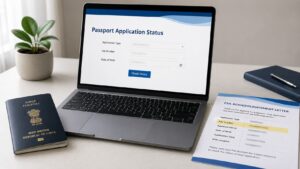
To track status, use three details. Passport Seva asks for Application Type, File Number, and Date of Birth. Use your file number, not ARN or passport number.
Your file number identifies the application you submitted. You use it for status tracking and official follow-up. For police verification questions, share it only when official support asks.
This page shares passport information, current as of 30 June 2026. It is not legal or immigration advice. For live portal fields, SMS, or support changes, check Passport Seva.
Need Expert Help on Your Passport Application?
Our passport agents handle forms, documents, and just one call away..
What is a passport file number?
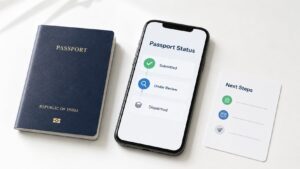
A passport file number identifies your submitted passport application. Passport Seva uses it when you track status. The status screen asks for file number and date of birth. It also asks you to select application type first.
Think of it as your application tracking number. It belongs to your passport application file. It does not replace your passport number. It also does not become your ARN.
You need this number after your PSK visit. It helps you track your passport application. It can also help Passport Seva support find the right file.
What does a passport file number look like?
A passport file number has letters and numbers together. The official status screen sample uses BN1065269282921. The acknowledgement letter sample uses BN1086268405513. Do not copy these numbers. Use the number printed on your own acknowledgement letter.
| Field | Example | What it means |
|---|---|---|
| File Number on status screen | BN1065269282921 | Sample number in the status field |
| File Number on acknowledgement letter | BN1086268405513 | Sample number on the letter |
| Date of Birth | 05/03/1992 | Sample applicant date of birth |
The Passport Seva PDF describes the acknowledgement-letter file number as 15 digit alpha-numeric. The same sample places it at the top right. Use this official source before any third-party claim about number length.
Where can you find the file number?
Start with your PSK acknowledgement letter. The file number appears at the top right. Passport Seva issues this letter after you submit your application at the PSK.
Look near the barcode area. The sample letter places the file number on the right side. Your number will differ from the sample. Match the label, not the sample value.
Do not start with the issued passport booklet. Anaya’s brief kept that location as an open source slot. Use that claim only after official proof or a redacted first-party passport image.
If you add an image, use a redacted acknowledgement letter. Hide name, date of birth, address, barcode, and token number. Show only the file-number area.
How to check passport status with file number
Open Passport Seva Track Application Status. Select the application type. Enter the file number and applicant date of birth. Then press Track.
Use this order:
- Select Application Type.
- Enter File Number.
- Enter Date of Birth.
- Press Track.
- Read the latest status.
Use the file number from your acknowledgement letter. Enter the applicant date of birth. Do not use another family member’s date. A typing error can block the status result.
Can you find passport file number online?
You can check your Passport Seva account records. Do not assume every account screen displays the file number. Passport Seva online instructions confirm the View Saved/Submitted Applications screen. The same instructions mention appointment actions.
Try this order if you lost the letter:
- Search your downloads.
- Check your application email.
- Sign in to Passport Seva.
- Open saved or submitted applications.
- Check appointment and receipt records.
- Use Passport Seva support if needed.
Do not write that the account always shows file number beside ARN. That needs an official screenshot or a redacted first-party account image. The locked brief marks this as a source slot.
Use mPassport Seva app with file number
You can use the Passport Seva mobile app for status tracking. Passport Seva states that users can track passport applications with file number and date of birth.
Use the same details as the website when the app asks for them. Enter the file number from your acknowledgement letter. Enter the applicant date of birth. Check the current app screen before adding any screenshot or screen label.
Check status through SMS or call centre
Passport Seva also lists SMS and call centre support. Use these when the website or app does not work.
| Option | What to use | What to know |
| SMS | STATUS [File Number] to 9704100100 | Recheck before publishing |
| Call centre | 1800-258-1800 | Toll-free national number |
| IVRS | 1800-258-1800 | Automated phone support runs 24 hours |
Passport Seva lists the SMS format as STATUS followed by the file number. One official example is STATUS BNG071268435013. Replace that sample with your own file number. Recheck the live Passport Seva page before publication because SMS text can change.
Passport Seva lists 1800-258-1800 as the toll-free call centre number. Citizen Service Executive support runs from 8 AM to 10 PM. IVRS support runs for 24 hours. Confirm these details again on publish day.
File number vs ARN vs passport number
Use the exact field Passport Seva asks for. If the screen asks for File Number, enter your file number. Do not enter ARN or passport number there.
| Term | What it means | Where you use it |
| File Number | Application tracking number | Status checks and official follow-up |
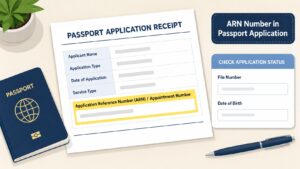
| ARN | Application Reference Number | Application and appointment flow |
| Passport Number | Number on issued passport | Travel and identity use |
Passport Seva appointment instructions mention ARN during the application and appointment process. The same instructions mention the View Saved/Submitted Applications screen.
The file number belongs to the submitted application file. ARN belongs to the application reference flow. Passport number belongs to the issued passport. Treat all three as separate unless Passport Seva asks for one field.
File number and police verification
Your file number can help Passport Seva support refer to your application. Use it if official support asks for that application detail. The status source confirms status tracking first. Do not call it a police verification result.
The acknowledgement letter sample also includes a Police Verification Mode field. The letter can help you discuss the same application file. It does not prove that police verification has finished.
If you have a police verification question, check your latest status first. Then contact Passport Seva support with your file number and date of birth. This helps support staff refer to the right application.
What if the status page rejects your file number?
Recheck the three fields first. The status screen uses Application Type, File Number, and Date of Birth. One wrong field can stop the status result.
Try these checks:
- Select the correct application type.
- Copy the file number from the letter.
- Remove extra spaces around the number.
- Enter the applicant date of birth.
- Try the Passport Seva mobile app.
- Call Passport Seva support if it still fails.
Do not replace the file number with ARN. Do not replace it with passport number. Use the field label shown on Passport Seva.
Protect your file number
Treat your file number as application information. Share it only with Passport Seva support or a trusted helper. Do not post it in public comments.
Avoid full screenshots. A screenshot may show name, date of birth, address, barcode, or token number. Crop the image before sending it.
Save your acknowledgement letter in two private places. Store one copy on your phone. Store another copy in email or cloud storage.
Need help reading your passport documents?
If you still cannot find the file number, The Passport Agents can help. We can read your documents and point you to the next official step.
We cannot change Passport Seva records. We cannot replace official verification. Your safest next step starts with the acknowledgement letter, Passport Seva portal, or official support.
Frequently Asked Questions
What is a file number in a passport application?
A file number is the tracking number for your submitted passport application. Passport Seva uses it with date of birth to show application status.
Where is the file number on the acknowledgement letter?
The file number appears at the top right of the PSK acknowledgement letter. The official sample uses BN1086268405513 on that letter.
What details do I need to track passport status?
You need Application Type, File Number, and Date of Birth. Passport Seva lists these fields in the status tracking steps.
Can I use passport number when Passport Seva asks for file number?
Do not use passport number when the screen asks for file number. Passport number belongs to the issued passport. File number belongs to application tracking.
Can I use ARN when Passport Seva asks for file number?
Do not use ARN when the screen asks for file number. Passport Seva uses ARN in the application and appointment flow. The status screen asks for file number.
Can I check passport status through SMS?
Yes. Passport Seva lists the SMS format as STATUS [File Number] to 9704100100. Recheck the live official page before publication or use.
Can I track status through mPassport Seva?
Yes. The Passport Seva mobile app supports application status tracking. Use the same file number and date of birth when the app asks for them.
What should I do if I lost the acknowledgement letter?
Check downloads, email, Passport Seva account records, and official support. Do not depend on unsourced claims about account screens showing file number.
Still Confused About the Process? Talk to a Passport Agent Today
Your next step
Open your PSK acknowledgement letter. Copy the file number from the top right. Then enter Application Type, File Number, and Date of Birth on Passport Seva.
If it still does not work, call official support. Put the acknowledgement letter near you. You are solving one field problem, not starting the whole application again.