

 Passport Guide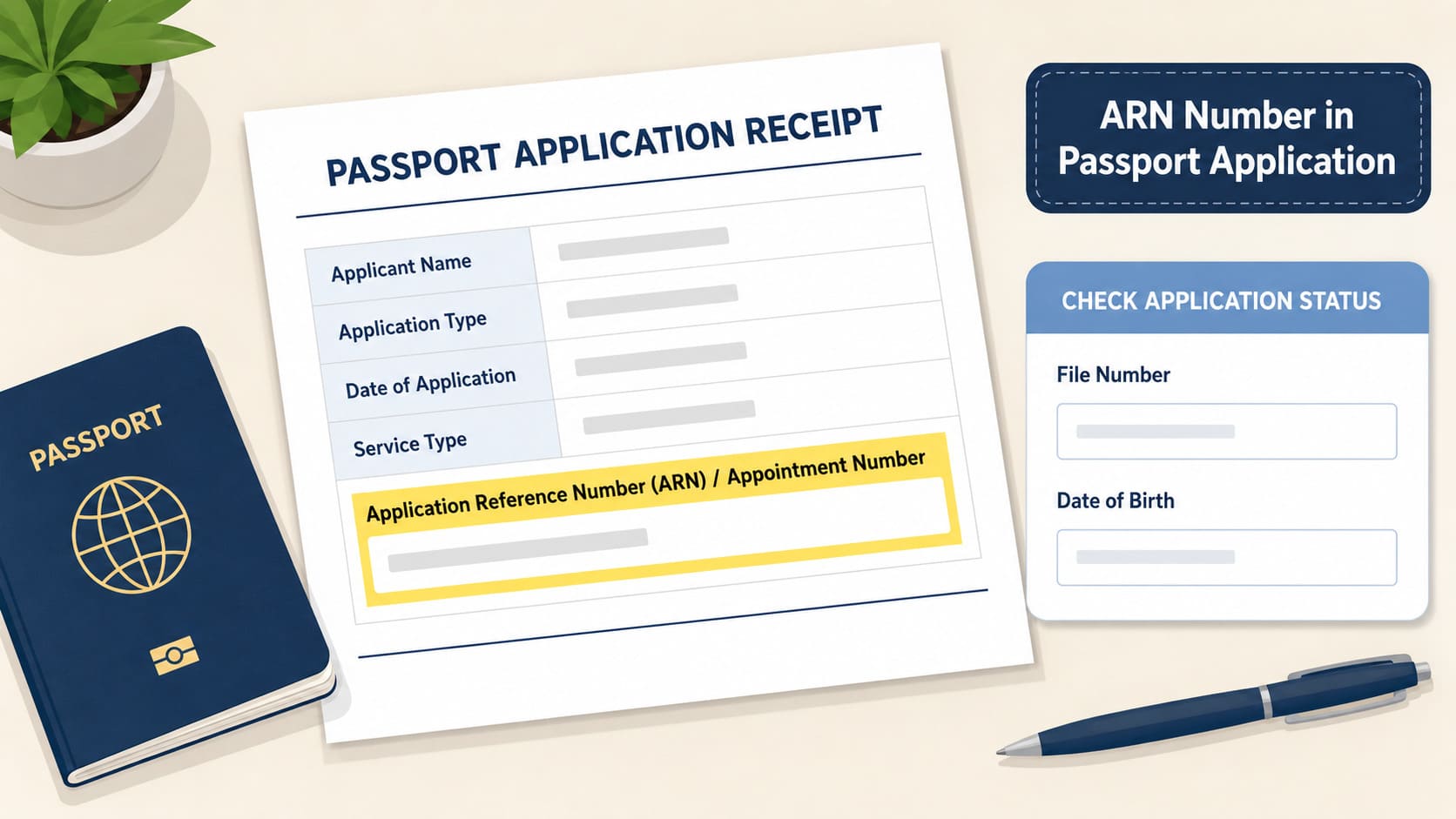
ARN number in passport refers to the Application Reference Number attached to a submitted passport application. Passport Seva creates ARN after the applicant submits the completed application online. The application receipt contains Application Reference Number (ARN)/Appointment Number, so the receipt is the first place to check.
ARN is separate from file number and passport number. The Passport Seva status page asks for application type, file number, and date of birth. Type ARN only in a field named Application Reference Number. For status, type the file number. Passport number applies after passport issue.
Need Expert Help on Your Passport Application?
Our passport agents handle forms, documents, and just one call away..
Main Points for Applicants
- ARN stands for Application Reference Number.
- Passport Seva creates ARN after online application submission.
- The application receipt contains ARN/Appointment Number.
- File number appears on the PSK acknowledgement letter.
- Passport status check needs file number and date of birth.
- ARN does not work as passport number.
- ARN does not track Speed Post delivery.
What is ARN in Passport Application?
ARN stands for Application Reference Number. It is the reference attached to a submitted passport application, not the number printed in an issued passport booklet. Passport Seva creates ARN after online submission, before the file number and passport number stages.
Applicants see ARN on the application receipt. Passport Seva receipt wording shows Application Reference Number (ARN)/Appointment Number, so ARN can appear close to appointment details. This is why ARN, appointment number, file number, and passport number must stay separate.
When Does Passport Seva Create ARN?
Passport Seva creates ARN after the completed passport application is submitted online. The official process says a unique Application Reference Number gets generated after submission. The application receipt then carries the ARN/Appointment Number wording.
Application order:
- Fill the passport form.
- Submit the form online.
- Get ARN on the application receipt.
- Book or manage the appointment.
- Visit PSK or POPSK.
- Collect the acknowledgement letter.
- Enter file number for passport status.
This order matters because each number has one job. ARN starts the application reference. File number supports status checks after the PSK or POPSK visit. Passport number comes after passport issue.
Where to Find ARN Number in Passport Application?
Check the application receipt first. Passport Seva states that the Print Application Receipt link prints the application receipt containing Application Reference Number (ARN)/Appointment Number.
The receipt can show more than one number. Read the label beside the number before typing it into any form. ARN points to the passport application. Appointment number points to the booked appointment. Payment Reference Number points to payment.
ARN Number on the Application Receipt
The application receipt contains the ARN. Check the receipt saved or printed after online submission or appointment booking. Keep the receipt until the passport process ends because it connects the submitted application with appointment details.
Do not treat ARN as passport number. ARN belongs to the application stage. Passport number belongs to the issued passport booklet.
ARN and Appointment Number on the Application Receipt
ARN and appointment number can sit close together on the application receipt, but they are separate labels. ARN refers to the application reference. Appointment number refers to the appointment record.
Before entering a number, match it with the field name. A field named Application Reference Number needs ARN. A field named Appointment Number needs the appointment number shown on the receipt.
ARN Number Vs File Number Vs Passport Number
ARN, file number, and passport number serve different jobs. The right number depends on the stage of the passport application.
| Number | When you get it | Where you find it | Main use |
|---|---|---|---|
| ARN | After online submission | Application receipt | Application reference |
| Appointment number | After appointment booking | Receipt or appointment details | Appointment reference |
| File number | After PSK or POPSK visit | Acknowledgement letter | Passport status check |
| Passport number | After passport issue | Passport booklet | Passport identity |
Passport Seva’s status-check PDF says the file number is a 15 digit alpha-numeric number printed on the top right of the acknowledgement letter. The applicant receives that letter at the PSK exit point after application submission.
Match the number to the field. A file number field needs file number. An Application Reference Number field needs ARN. A passport number field needs the number from the issued passport booklet.
How to Check Passport Status
Passport Seva Track Application Status asks for application type, file number, and date of birth. The status page does not ask for ARN.
To check status:
- Open Passport Seva Track Application Status.
- Select the application type.
- Enter the file number.
- Enter the date of birth.
- Submit the form.
If you have ARN but no file number, check whether you already visited PSK or POPSK. The file number appears after that stage on the acknowledgement letter, not on the first application receipt.
How to Find the File Number for Status Check
Check the acknowledgement letter from PSK or POPSK. Passport Seva’s official PDF marks the file number on the top right of that letter.
Keep the acknowledgement letter safe until the passport process ends. It connects your passport application to the status page, SMS status flow, and call-centre status check.
How to Check Passport Status by SMS
Passport Seva lists SMS status checking in this format:
STATUS [File Number]
Send the SMS to 9704100100. This SMS format needs file number, not ARN.
What Can ARN Help With After Submission?
ARN helps when the passport process needs an application reference. It is most useful before passport issue, when the applicant still has receipt and appointment records instead of a passport booklet.
Check the field name before entering it. If the page asks for Application Reference Number, ARN is the right number. If the page asks for file number, use the file number from the acknowledgement letter.
| Use | What ARN does |
| Application receipt | Links the receipt with the submitted passport form |
| Appointment record | Connects the application reference with appointment details |
| Service request tracking | Works when the field asks for Application Reference Number |
Passport Seva service request tracking asks users to enter at least one field from Service Request Number, Application Reference Number, File Number, or Passport Number.
ARN does not prove police verification, printing, dispatch, or delivery. Later stages need the correct Passport Seva status page, service request field, or delivery tracking detail.
What Can ARN Number Not Do?
ARN cannot replace file number, passport number, or postal tracking details. It is an application reference, not an all-purpose passport number.
This difference prevents common entry mistakes. The status form asks for file number. A visa or travel form asks for passport number after issue. Delivery tracking needs Speed Post or dispatch details after the passport is sent.
ARN Cannot Replace File Number for Passport Status
Passport Seva status check needs file number and date of birth. The file number comes from the acknowledgement letter issued after the PSK or POPSK stage.
If the status page asks for file number, enter file number. ARN belongs to the earlier application receipt stage.
ARN Cannot Work as Passport Number
ARN is not passport number. Passport number belongs to the issued passport booklet.
Do not enter ARN on visa forms, flight records, hotel records, bank forms, or any form that asks for passport number. Wait for the issued passport and copy the passport number from the booklet.
ARN Does Not Confirm Passport Issue
ARN confirms that Passport Seva created an application reference after submission. It does not confirm passport approval, printing, dispatch, or delivery.
After you get the file number, check progress on the official status page. That page shows the application stage linked to the file number.
ARN Cannot Track Passport Delivery
ARN is not a Speed Post tracking number. Passport Seva asks applicants to check passport delivery through India Post’s Speed Post Tracking Utility after dispatch.
For delivery, check the dispatch or postal tracking details shown after the passport is sent. Keep ARN for pages that ask for Application Reference Number.
What to Do If You Lost Your ARN?
If you lost ARN, check whether you already have file number. Losing ARN does not stop passport status tracking after you have the acknowledgement letter, because Passport Seva status check asks for file number and date of birth.
Check the application receipt first if you have not reached that stage. Passport Seva links ARN with the application receipt, so the receipt is the strongest record to check for ARN.
Step 1: Check the Application Receipt
Find the saved or printed application receipt. Look for Application Reference Number (ARN)/Appointment Number.
Keep the receipt private. Do not post ARN, file number, date of birth, or passport details on public forms, comment sections, or unofficial tracking pages.
Step 2: Check Submitted Application Records
Log in to the official Passport Seva account and check the submitted application records or receipt details available there. Copy only the number that is labelled Application Reference Number.
Do not rely on screenshots from random websites for account steps. Passport Seva screens can change, so read the current portal label before copying any number.
Step 3: Use File Number if You Have It
Use file number if the PSK or POPSK acknowledgement letter is available. Passport Seva status check asks for file number and date of birth.
At this stage, file number is the better number for status. Check the acknowledgement letter before searching again for ARN.
Step 4: Contact Passport Seva Help
Contact Passport Seva help if the correct number still fails. Passport Seva’s call-centre page lists 1800-258-1800 and says applicants can check status through the call centre or IVR by file number.
Do not assume the call centre can recover a lost ARN. Ask through official Passport Seva channels and provide only the number they request.
Step 5: Use the Correct Service Request Field
If you open a service request page, match your number to the field label. Passport Seva service request tracking accepts Service Request Number, Application Reference Number, File Number, or Passport Number.
Enter ARN only in the Application Reference Number field. Enter file number only in the file number field. Enter passport number only after passport issue.
Still Confused About the Process? Talk to a Passport Agent Today
Frequently Asked Questions
What is passport ARN number?
Passport ARN number is the Application Reference Number for a submitted passport application. It appears on the application receipt as Application Reference Number (ARN)/Appointment Number. Treat it as an application reference, not as file number or passport number.
Where is ARN number written?
ARN is written on the application receipt. Passport Seva says the Print Application Receipt link prints the receipt containing Application Reference Number (ARN)/Appointment Number. Check the saved or printed receipt from the online application or appointment step.
Is ARN printed on my passport?
No. ARN is not printed as passport number. ARN belongs to the application stage, before passport issue. Passport number appears on the issued passport booklet. Keep ARN for application reference only.
Can I check passport status with ARN?
Passport Seva status check asks for file number and date of birth. It does not ask for ARN on the Track Application Status page. Enter ARN only on an official page that asks for Application Reference Number.
Why does Passport Seva ask for file number?
Passport Seva uses file number for status checks after the PSK or POPSK stage. The file number appears on the acknowledgement letter issued at the PSK exit point. ARN comes earlier, so it does not replace file number for this step.
What if I have ARN but no file number?
You have likely not reached the PSK or POPSK acknowledgement stage yet. Check the application receipt and appointment details first. After the PSK or POPSK visit, check the acknowledgement letter for file number.
Can I use ARN for a service request?
Yes, if the service request page asks for Application Reference Number. Passport Seva service request tracking also accepts Service Request Number, File Number, and Passport Number. Match your number to the field label before entering it.
What if I lost my ARN receipt?
Check saved receipts first. Then check submitted application records on Passport Seva. If you already have the acknowledgement letter, use file number for status tracking. Contact Passport Seva help if the correct number still fails.
Is ARN the same as appointment number?
No. ARN and appointment number are different labels. ARN refers to the application reference. Appointment number refers to the appointment record. They can appear close together on the application receipt, so read the label before entering either number.
Is ARN the same as file number?
No. ARN comes after online form submission. File number comes after the PSK or POPSK stage and appears on the acknowledgement letter. Passport Seva status check uses file number and date of birth.
Sources Checked
This page was checked against Passport Seva pages for ARN creation, application receipt wording, status fields, file-number location, SMS status, service request tracking, call-centre status checks, and postal delivery tracking. Passport Seva pages can change. Check Passport Seva before entering any number or submitting any request.
Disclaimer
For ordinary passport applicants only. This page shares general information. It is not legal or immigration advice. Check Passport Seva for the latest status fields, receipt wording, help options, and service request fields before you enter any passport detail.
Resources
- https://www.passportindia.gov.in/psp/Apply
- https://www.passportindia.gov.in/psp/ApplyReissue
- https://services1.passportindia.gov.in/psp/FaqFeePayment
- https://www.passportindia.gov.in/psp/trackApplicationService
- https://passportindia.gov.in/AppOnlineProject/pdf/Steps_to_Check_Application_Status.pdf
- https://www.passportindia.gov.in/psp/AccessInformation
- https://www.passportindia.gov.in/psp/Track2
- https://services1.passportindia.gov.in/psp/FaqCallCentre
- https://www.passportindia.gov.in/psp/passportApp